1.103.0.0
Add-in
✨ Improved
New models created from a project template are now saved to the default path for user files set in Revit Options. If no path is set, the Documents folder is used.
🔧 Fixed
Fixed an issue where Revit could stop responding for a long time.
Fixed an issue where creating another model from the same project template could fail because a file with the same name already existed. A number is now added to the new model's file name when needed.
🧹 Cleanup
Improved performance and stability.
Updated internal dependencies.
1.102.0.0
Add-in
🚀 New: Searchable text in drafting views, sheets, and detail items
Kinship now extracts the text contained in drafting views, sheets, and detail items stored in the library. Searching from the Revit Add-in finds these items by the text that appears in them.
What is extracted
Text notes, annotation tags, keynotes, generic annotations, titleblock text, and view and sheet names and numbers.
For sheets, Kinship collects text from the sheet and from everything placed on it, including the views on the sheet and the detail items inside those views, so a sheet can be found by text that appears anywhere on it.
Limits
Dimension values inside detail item families are not extracted.
Text in imported CAD files, images, and PDFs is not read.
🚀 New
Added a Run diagnostics button to the Kinship page in the Revit Options dialog. It checks for connection, installation, and configuration issues affecting Kinship.
✨ Improved
Adding a project template now checks the model's file size before upload and shows a File is too large message when the model exceeds the maximum upload size.
🔧 Fixed
Fixed an issue where searching for the beginning of a word could return no results when a closer match existed elsewhere. For example, "volum" now finds families named "Volumenstromregler" as well as "Volume". Closer matches still appear first.
Fixed an issue where searching with a project selected could leave out content that belongs to that project, including content from restricted collections assigned to it.
Fixed an issue where selecting a family from a restricted collection in search results could show "Nothing found" instead of the family's types.
Fixed an issue where a restricted collection shared with a team member was missing from the Collections filter in search, even though the member could open it on the web app.
Fixed an issue where loading a sheet from Kinship could place several copies of its title block on top of each other. Title blocks and annotations on loaded sheets and drafting views are now placed once. This includes sheets already in the library.
Fixed an issue where files loaded from Kinship, such as families and material images, were downloaded twice. If the second download failed, the file could be lost and loading could fail. Each file is now downloaded once.
Fixed an issue where loading families from the web app into Revit could fail with a connection error for users on private networks.
Fixed an issue where characters such as umlauts in type catalogs could be read incorrectly when the catalog was not saved as UTF-8. UTF-8 and UTF-16 catalogs are now detected automatically, and other catalogs are read using the computer's Windows ANSI code page. When Kinship rewrites a catalog to load selected types, the original file is restored unchanged. UTF-8 remains the recommended format.
Fixed an issue where an upgraded family file could remain locked while the family stayed open, preventing the upgraded version from being saved back to the library.
Fixed an issue where guide grids were included with sheets added to the library.
Fixed an issue where comments entered when adding a project template were not stored with the template, ensuring they appear on the template page.
Fixed an issue where the family details panel in the library could show the wrong source and link for families that belong to collections.
Fixed an issue where Administrators, Security Administrators, and Owners could be refused when overriding a "Do not track" rule from Model Sync Status and told to contact a team administrator. Permissions are now refreshed each time Model Sync Status is used, so role changes take effect without restarting Revit.
Fixed an issue where Survey Point metadata from models in non-English Revit installations was not recognized by the web app. Changing only the Survey Point coordinates now sends updated project metadata to Kinship.
🧹 Cleanup
Improved performance and stability.
Updated internal dependencies and build tooling.
1.101.13.0
Add-in
Beta
🔧 Fixed
Fixed an issue where searching for the beginning of a word could return no results when a closer match existed elsewhere. For example, "volum" now finds families named "Volumenstromregler" as well as "Volume". Closer matches still appear first.
Fixed an issue where some words in the text extracted from drafting views, sheets, and detail items could not be found by search.
Fixed an issue where selecting a family from a restricted collection in search results could show "Nothing found" instead of the family's types.
Fixed an issue where a restricted collection shared with a team member was missing from the Collections filter in search, even though the member could open it on the web app.
Fixed an issue where searching with a project selected could leave out content that belongs to that project, including content from restricted collections assigned to it.
Fixed an issue where Administrators, Security Administrators, and Owners could be refused when overriding a "Do not track" rule from Model Sync Status and told to contact a team administrator. Permissions are now refreshed each time Model Sync Status is used, so role changes take effect without restarting Revit.
Fixed an issue where Survey Point metadata from models in non-English Revit installations was not recognized by the web app. Changing only the Survey Point coordinates now sends updated project metadata to Kinship.
Fixed an issue where characters such as umlauts in type catalogs could be read incorrectly when the catalog was not saved as UTF-8. UTF-8 and UTF-16 catalogs are now detected automatically, and other catalogs are read using the computer's Windows ANSI code page. When Kinship rewrites a catalog to load selected types, the original file is restored unchanged. UTF-8 remains the recommended format.
1.101.11.0
Add-in
Beta
🚀 New: Searchable text in drafting views, sheets, and detail items
Kinship now extracts the text contained in drafting views, sheets, and detail items stored in the library. Searching from the Revit Add-in finds these items by the text that appears in them.
What is extracted
Text notes, annotation tags, keynotes, generic annotations, titleblock text, and view and sheet names and numbers.
For sheets, Kinship collects text from the sheet and from everything placed on it, including the views on the sheet and the detail items inside those views, so a sheet can be found by text that appears anywhere on it.
Limits
Dimension values inside detail item families are not extracted.
Text in imported CAD files, images, and PDFs is not read.
🚀 New
Added a Run diagnostics button to the Kinship page in the Revit Options dialog. It checks for connection, installation, and configuration issues affecting Kinship.
✨ Improved
Adding a project template now checks the model's file size before upload and shows a File is too large message when the model exceeds the maximum upload size.
🔧 Fixed
Fixed an issue where comments entered when adding a project template were not stored with the template, ensuring they appear on the template page.
Fixed an issue where loading families from the web platform into Revit could fail with a connection error for users on private networks.
Fixed an issue where the family details panel in the library could show the wrong source and link for families that belong to collections.
Fixed an issue where guide grids were included with sheets added to the library.
Fixed an issue where an upgraded family file could remain locked while the family stayed open, preventing the upgraded version from being saved back to the library.
🧹 Cleanup
Improved performance and stability.
Updated internal dependencies and build tooling.
1.101.0.0
Add-in
🚀 New: Project Templates
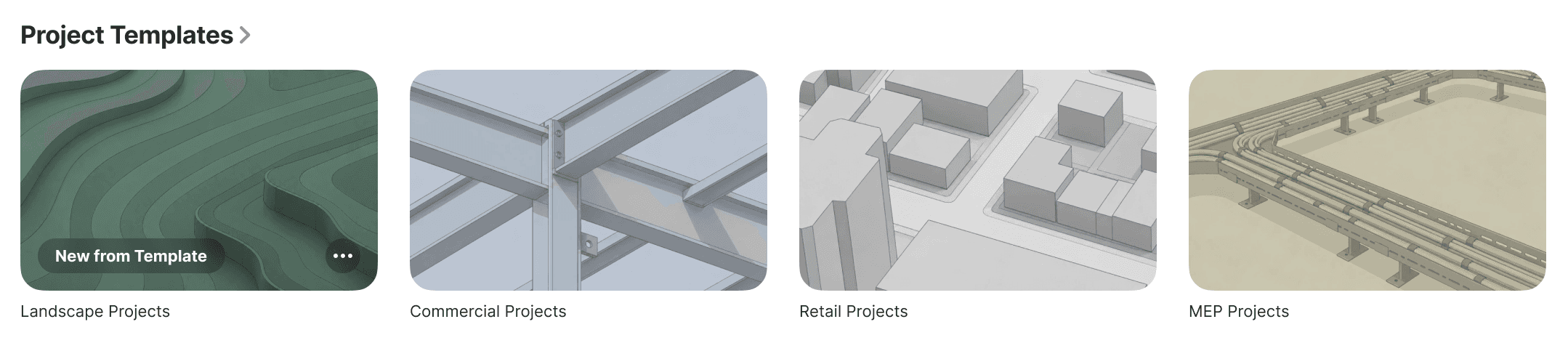
Project Templates lets teams store Revit project templates in the Kinship library and start new models from them without leaving Revit.
How it works
To add a template to your library, open the model in Revit and choose Project Template from the Add to Library dropdown. Then set a name and optionally add a comment. If a template with the same name already exists, Kinship will add the model as a new Revit version. If a template with the same name and same Revit version already exists, Kinship will overwrite the existing one.
To create a new model from a template, click the New Project button on the Kinship ribbon panel. This will display a list of the templates in your library. Selecting one starts a new model from that template. Templates might be available in several Revit versions, and Kinship automatically opens the version that most closely matches the one you are working in.
You can also start a new model from the Kinship web app by going to the Project Templates section on the Library landing page, clicking into any template and then choosing New from Template.
Availability
Everyone can start a model from a template using the New Project button.
Only Content Managers and above can add or update templates.
Limits
Templates can be .rte or .rvt files, and the latter either central or non-central models.
The New Project dialog lists only templates available in your Revit version or earlier.
Newly added templates will appear for use only once their upload finishes processing.
✨ Improved
Updated the Kinship ribbon with a refreshed icon set and clearer tooltips and descriptions for every button.
1.100.0.0
Add-in
🔧 Fixed
Fixed an issue preventing some details from being loaded.
Fixed an issue where materials assigned to family Object Styles could be unassigned in some cases.
🧹 Cleanup
Improved performance and stability.
Refactored internal code in preparation for new features.
1.99.6.0
Add-in
Beta
🔧 Fixed
Fixed an issue where materials assigned to family Object Styles could be unassigned in some cases.
🧹 Cleanup
Improved performance and stability.
Refactored internal code in preparation for new features.
1.99.0.0
Add-in
✨ Improved
Tracked models with Materials enabled now process custom material images after Sync with Central, reducing the need to reopen a model before Kinship copies newly added material images.
Improved material image handling so Revit’s built-in material images and images referenced through custom render appearance folders keep their existing paths. Custom image files added from direct file paths are still copied into Kinship when Materials is enabled.
Improved cleanup of uploaded family files by clearing unused Object Style material references and removing unused Revit material assets more completely.
Updated add-in installation support for Revit 2026 and above while preserving compatibility with earlier Revit versions.
Improved compatibility for the browsable search interface in Revit 2024 and above, reducing conflicts with other add-ins that use WebView2.
🔧 Fixed
Fixed an issue where private collections and projects could be missing from the Revit Add-in search scope filters for Admins.
Fixed an issue where uploading files or folders could fail to generate thumbnails for selected RFA files.
Fixed an issue where family uploads could remain stuck in pending upload after a successful upload.
Fixed an issue where material processing could show a Revit worksharing error when another user owned a material appearance asset.