Now in Kinship: Details Deep Search
Search all the text elements in your drafting views and sheets. Find the right detail even when its name doesn’t give it away.
Now in Kinship: Details Deep Search
Search all the text elements in your drafting views and sheets. Find the right detail even when its name doesn’t give it away.

Construction details are packed with information. That’s what makes them such an important part of projects. It’s also what can make finding the right one feel like looking for a needle in a haystack.
You can know the exact detail you’re looking for. But if it’s sitting in a drafting view named something like TYP-DTL-047, good luck finding it. The name tells you nothing. The knowledge is in the drawing itself: the text notes, the callouts, the annotations.
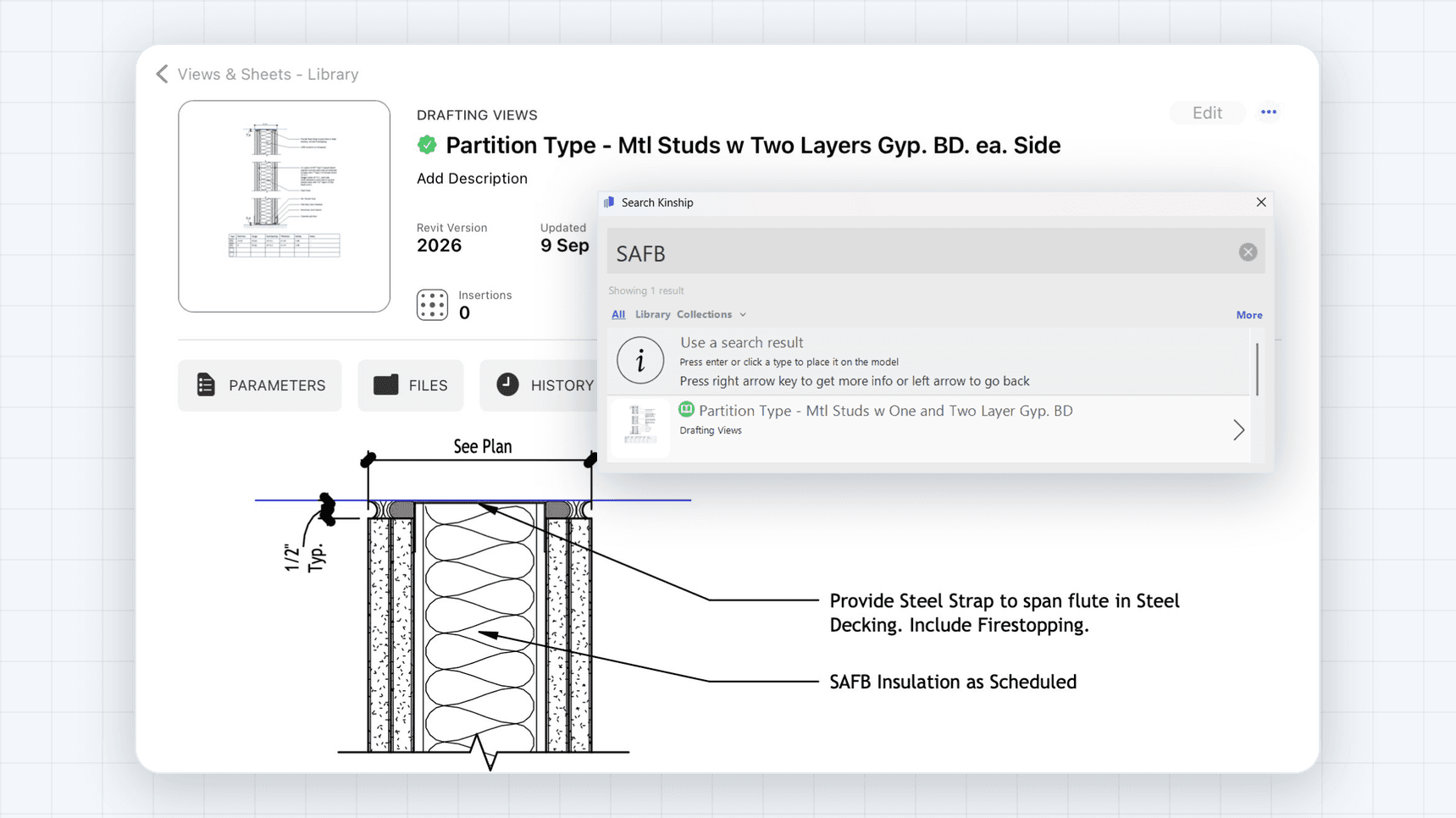
Kinship’s new Details Deep Search fixes this. The Kinship Revit add-in now searches all of the text elements inside your drafting views and sheets, so you can find details by what they actually say, not just what they’re called.
Why this matters
Naming conventions are great, and you should have them. But even the best naming convention can only carry so much information. A detail named EXT-WALL-PARAPET-01 won’t tell you whether it mentions a specific membrane product, a keynote, or that one waterproofing condition you’re trying to track down.
The real content of a detail lives in its annotations. Until now, that text was invisible to search. You either remembered where a detail lived, or you opened views one by one until you found it. At the scale of a firm-wide detail library, that adds up to a lot of lost time and, worse, a lot of redrawn details that already existed.
How it works
Just search in the Kinship add-in like you normally would. Your results will now include drafting views and sheets where your search terms appear in the text elements, not just in the name or parameters.
Search for “vapor barrier” and you’ll find every drafting view and sheet that mentions one, whether or not those words ever made it into a view name.
Where it helps
Finding the right typical detail: Search by product name, material, keynote, or condition instead of guessing which view name to look under
Harvesting details from projects: Upload details from projects to a collection, and your team can quickly confirm if there are any details covering their specific conditions before anyone redraws it.
Reviewing your detail library: Find every detail that references an outdated product, spec section, or note so you can update them together
The fastest way to see the value: think of a detail you know exists but could never find by name, then search for a phrase you know is written inside it. That’s it.
Details worth knowing
Details Deep Search is available in the Kinship Revit add-in and requires the latest release, version 1.102. If you’re running an older version, update your add-in and the search is ready to use.
Your details have always known more than their names let on. Now your search does too.
Construction details are packed with information. That’s what makes them such an important part of projects. It’s also what can make finding the right one feel like looking for a needle in a haystack.
You can know the exact detail you’re looking for. But if it’s sitting in a drafting view named something like TYP-DTL-047, good luck finding it. The name tells you nothing. The knowledge is in the drawing itself: the text notes, the callouts, the annotations.
Kinship’s new Details Deep Search fixes this. The Kinship Revit add-in now searches all of the text elements inside your drafting views and sheets, so you can find details by what they actually say, not just what they’re called.
Why this matters
Naming conventions are great, and you should have them. But even the best naming convention can only carry so much information. A detail named EXT-WALL-PARAPET-01 won’t tell you whether it mentions a specific membrane product, a keynote, or that one waterproofing condition you’re trying to track down.
The real content of a detail lives in its annotations. Until now, that text was invisible to search. You either remembered where a detail lived, or you opened views one by one until you found it. At the scale of a firm-wide detail library, that adds up to a lot of lost time and, worse, a lot of redrawn details that already existed.
How it works
Just search in the Kinship add-in like you normally would. Your results will now include drafting views and sheets where your search terms appear in the text elements, not just in the name or parameters.
Search for “vapor barrier” and you’ll find every drafting view and sheet that mentions one, whether or not those words ever made it into a view name.
Where it helps
Finding the right typical detail: Search by product name, material, keynote, or condition instead of guessing which view name to look under
Harvesting details from projects: Upload details from projects to a collection, and your team can quickly confirm if there are any details covering their specific conditions before anyone redraws it.
Reviewing your detail library: Find every detail that references an outdated product, spec section, or note so you can update them together
The fastest way to see the value: think of a detail you know exists but could never find by name, then search for a phrase you know is written inside it. That’s it.
Details worth knowing
Details Deep Search is available in the Kinship Revit add-in and requires the latest release, version 1.102. If you’re running an older version, update your add-in and the search is ready to use.
Your details have always known more than their names let on. Now your search does too.


Kinship
The best way to manage Revit content
Kinship
The best way to manage Revit content
Kinship
The best way to manage Revit content
Similar Articles


Never miss an update with our monthly newsletter
Get the latest company news, product updates, blog posts and free Revit content from Kinship. Delivered directly to your inbox no more than once a month.
By submitting your email, you agree to receive newsletter emails.
Support
Never miss an update with our monthly newsletter
Get the latest company news, product updates, blog posts and free Revit content from Kinship. Delivered directly to your inbox no more than once a month.
By submitting your email, you agree to receive newsletter emails.
Support
Never miss an update with our monthly newsletter
Get the latest company news, product updates, blog posts and free Revit content from Kinship. Delivered directly to your inbox no more than once a month.
By submitting your email, you agree to receive newsletter emails.
Support