Now in Kinship: Project Templates
Kinship is designed to be the starting point for all of your team’s content in Revit. But every Revit project starts from a template. So where are your templates?
Now in Kinship: Project Templates
Kinship is designed to be the starting point for all of your team’s content in Revit. But every Revit project starts from a template. So where are your templates?

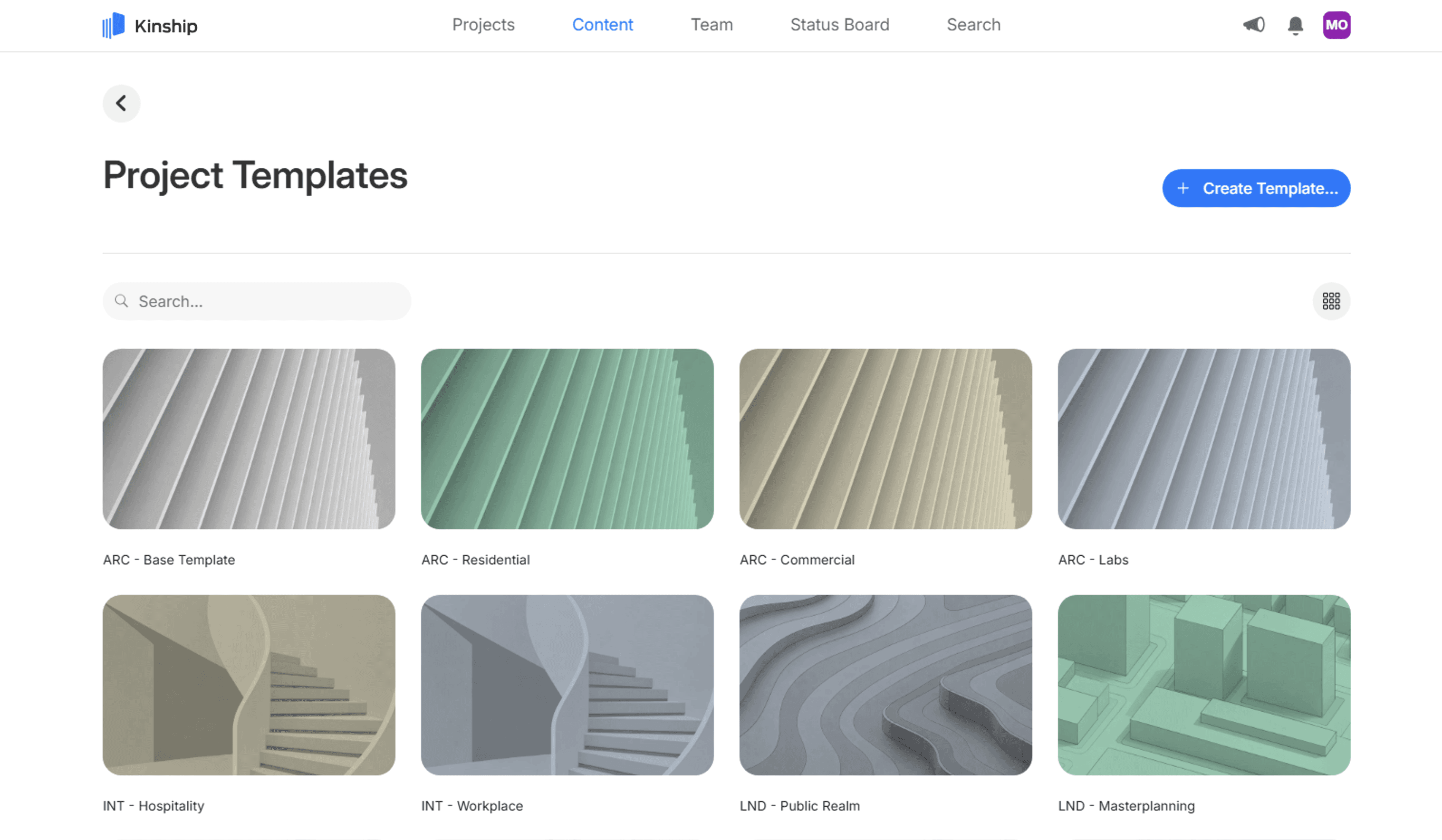
With the latest release of our web app and add-in, the answer is Kinship. Now you can easily manage and use your templates alongside all of the other content your team will use to create your projects.
Whether you like to start from RTE or RVT files, central or non-central, you can keep them all in your Kinship library. Your team can browse them, easily see what each one is for, and start a new project from the web or straight from their Revit ribbon, with the right Revit version picked automatically.
And this set of features is available to all of our customers, whether you’re on the Standard or Enterprise tier.
But why templates? That’s not “content”, or is it?
Kinship's job has always been to make Revit content manageable: Families (loadable or system ones), drafting views, legends, schedules, groups, view templates, materials and more, all connected to the models and projects where they end up. Project templates are a logical next step, and an overdue one.
Your template is the true home of your firm's standards. Your title blocks, annotation styles, preloaded families, and graphical standards, all packed into a single file. Most firms try to keep a small, carefully tuned set of them.
But where do they actually keep them? As files on a server, described only as well as a file name and folder will allow, found by memory and picked on faith.
That works right up until it doesn't. Nobody is quite sure whether Template_2026_FINAL_v3.rte is actually final. The healthcare team starts a project from the residential template. And when a template exists for four Revit versions, choosing the right file becomes a small act of hope.
Your project templates could and should be so much more. Hosting them in Kinship is the first step in getting there. And it’s a beautiful one.
Start new projects straight from Kinship
With Project Templates, everyone on your team can start a new Revit model using any available template in your library. Either from Revit or the web.
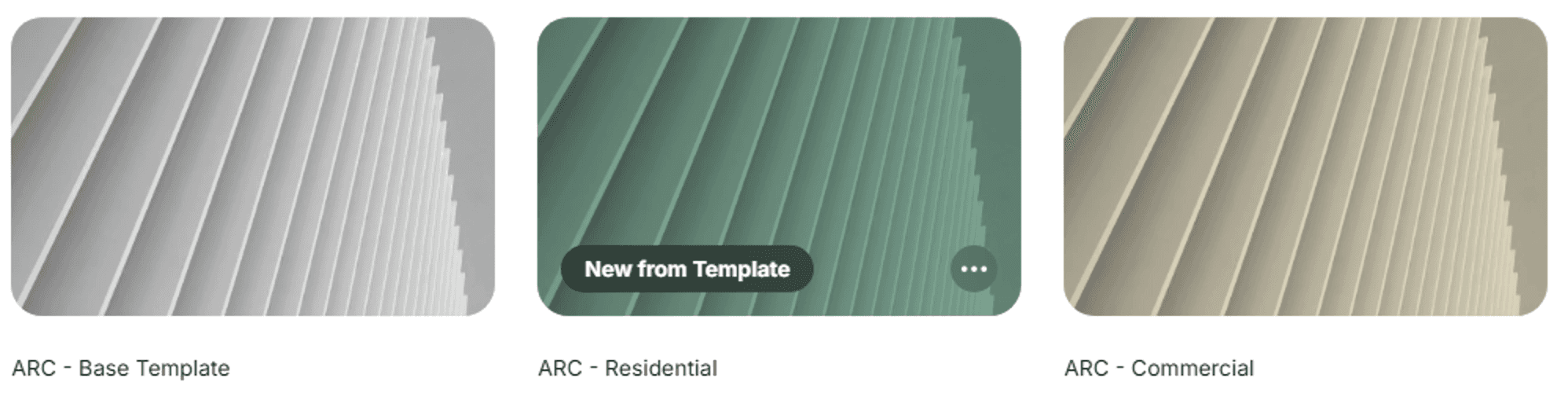
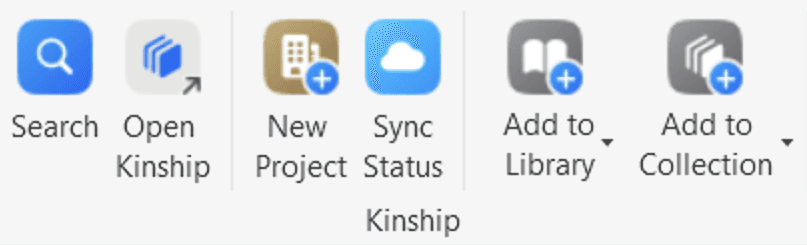
Either way, the result behaves exactly like Revit's own New > Project command, so everyone knows what to expect.
And it works the same whether your template is a proper template in RTE format, or just an RVT that the team should use as its starting point. Did we mention you can have either RTE or RVT files as templates?
Workshared templates are handled properly too, with all worksets preserved.
One template, every Revit version
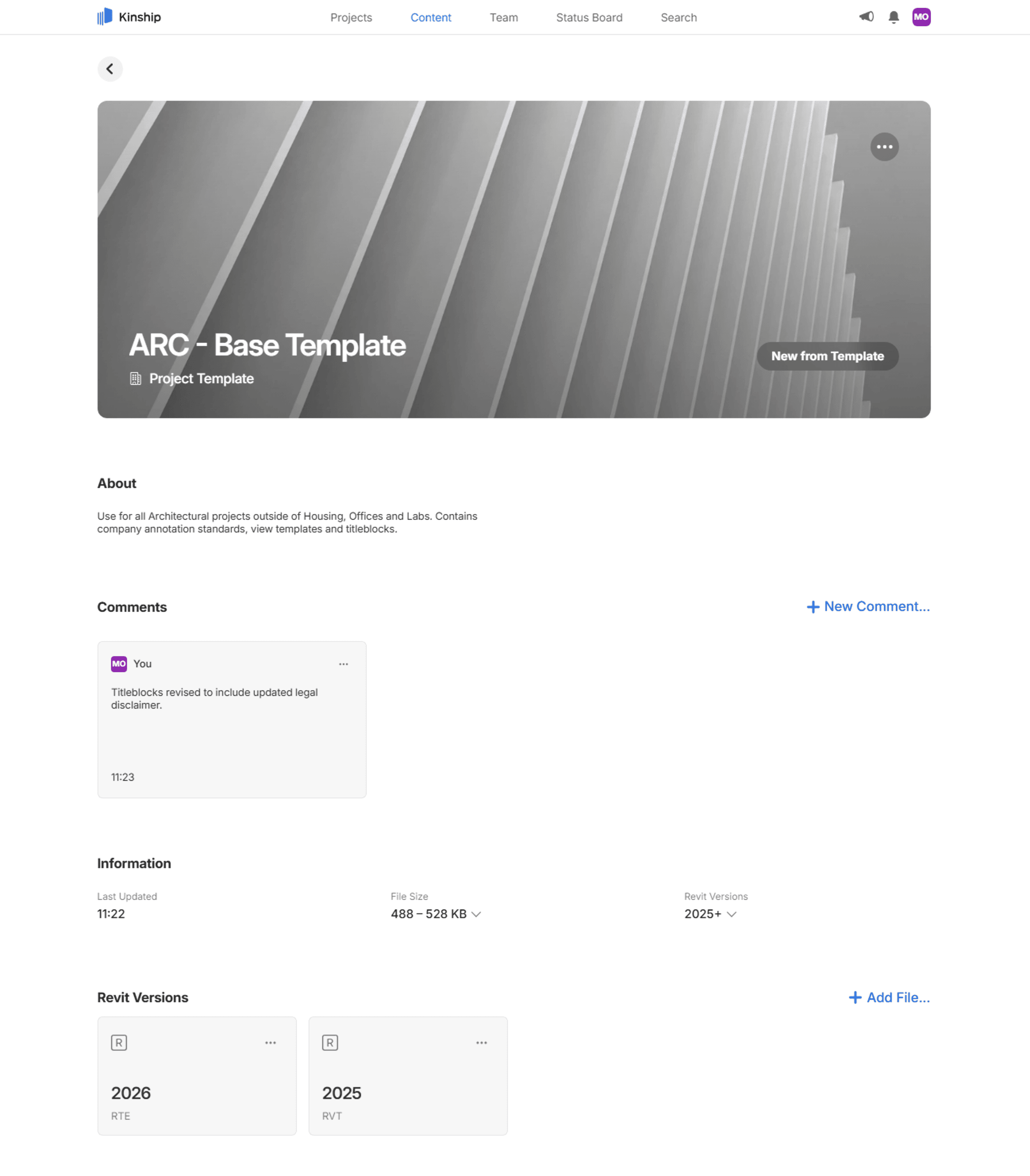
Most firms maintain each template across several Revit releases. Just like with content in your library, Kinship automatically keeps all of those files in one single entry for streamlined management.
When someone starts a new project, Kinship automatically uses the file that matches their Revit version. Your team stops having to parse file names or make sure they’re in the right folder, and you get to say goodbye to accidental upgrades and unnecessary questions.
Templates your team can recognize
On the server, a file name and folder location was all the identity a template could have. In Kinship, templates carry the same rich information as any other content in your Library:
Natural names. "Healthcare – Metric" can finally replace ACME_TMPL_HC_M_26_v12.rte for the team.
Banner artwork. Pick from a set of 13 designed project graphics in four colors to give each template a visual identity your team will recognize at a glance.
Descriptions. Tell the team what each template is for and when to use it, right on the template's page.
Comments. Keep track of what’s changed or added when uploading new files from Revit.
Adding and managing templates
Adding and managing templates is reserved for Content Managers and Administrators, and can also be done either from the web or in Revit.
Day-to-day upkeep happens from the template's page in the web app. There you can change the name, description or artwork. You can easily download or open version files for editing in Revit, add new files as new Revit versions arrive, or prune what’s obsolete.
Wrapping up
Your templates encode more of your firm's standards than any other single file you own. They deserve better than a network folder.
Now they can live alongside the families, materials, and view templates that go into them, and the projects that come out of them. One place to keep templates current, one place for your team to find them, and one click between any template and a new project.
Time to put your templates in Kinship, and let that old server retire in peace.
Ready to get more out of your templates? Book a demo and learn about our free trial offer. Existing users, make sure you’re on version 1.101 (or above) of our add-in to upload and open project templates.
With the latest release of our web app and add-in, the answer is Kinship. Now you can easily manage and use your templates alongside all of the other content your team will use to create your projects.
Whether you like to start from RTE or RVT files, central or non-central, you can keep them all in your Kinship library. Your team can browse them, easily see what each one is for, and start a new project from the web or straight from their Revit ribbon, with the right Revit version picked automatically.
And this set of features is available to all of our customers, whether you’re on the Standard or Enterprise tier.
But why templates? That’s not “content”, or is it?
Kinship's job has always been to make Revit content manageable: Families (loadable or system ones), drafting views, legends, schedules, groups, view templates, materials and more, all connected to the models and projects where they end up. Project templates are a logical next step, and an overdue one.
Your template is the true home of your firm's standards. Your title blocks, annotation styles, preloaded families, and graphical standards, all packed into a single file. Most firms try to keep a small, carefully tuned set of them.
But where do they actually keep them? As files on a server, described only as well as a file name and folder will allow, found by memory and picked on faith.
That works right up until it doesn't. Nobody is quite sure whether Template_2026_FINAL_v3.rte is actually final. The healthcare team starts a project from the residential template. And when a template exists for four Revit versions, choosing the right file becomes a small act of hope.
Your project templates could and should be so much more. Hosting them in Kinship is the first step in getting there. And it’s a beautiful one.
Start new projects straight from Kinship
With Project Templates, everyone on your team can start a new Revit model using any available template in your library. Either from Revit or the web.
Either way, the result behaves exactly like Revit's own New > Project command, so everyone knows what to expect.
And it works the same whether your template is a proper template in RTE format, or just an RVT that the team should use as its starting point. Did we mention you can have either RTE or RVT files as templates?
Workshared templates are handled properly too, with all worksets preserved.
One template, every Revit version
Most firms maintain each template across several Revit releases. Just like with content in your library, Kinship automatically keeps all of those files in one single entry for streamlined management.
When someone starts a new project, Kinship automatically uses the file that matches their Revit version. Your team stops having to parse file names or make sure they’re in the right folder, and you get to say goodbye to accidental upgrades and unnecessary questions.
Templates your team can recognize
On the server, a file name and folder location was all the identity a template could have. In Kinship, templates carry the same rich information as any other content in your Library:
Natural names. "Healthcare – Metric" can finally replace ACME_TMPL_HC_M_26_v12.rte for the team.
Banner artwork. Pick from a set of 13 designed project graphics in four colors to give each template a visual identity your team will recognize at a glance.
Descriptions. Tell the team what each template is for and when to use it, right on the template's page.
Comments. Keep track of what’s changed or added when uploading new files from Revit.
Adding and managing templates
Adding and managing templates is reserved for Content Managers and Administrators, and can also be done either from the web or in Revit.
Day-to-day upkeep happens from the template's page in the web app. There you can change the name, description or artwork. You can easily download or open version files for editing in Revit, add new files as new Revit versions arrive, or prune what’s obsolete.
Wrapping up
Your templates encode more of your firm's standards than any other single file you own. They deserve better than a network folder.
Now they can live alongside the families, materials, and view templates that go into them, and the projects that come out of them. One place to keep templates current, one place for your team to find them, and one click between any template and a new project.
Time to put your templates in Kinship, and let that old server retire in peace.
Ready to get more out of your templates? Book a demo and learn about our free trial offer. Existing users, make sure you’re on version 1.101 (or above) of our add-in to upload and open project templates.


Kinship
The best way to manage Revit content
Kinship
The best way to manage Revit content
Kinship
The best way to manage Revit content
Similar Articles


Never miss an update with our monthly newsletter
Get the latest company news, product updates, blog posts and free Revit content from Kinship. Delivered directly to your inbox no more than once a month.
By submitting your email, you agree to receive newsletter emails.
Support
Never miss an update with our monthly newsletter
Get the latest company news, product updates, blog posts and free Revit content from Kinship. Delivered directly to your inbox no more than once a month.
By submitting your email, you agree to receive newsletter emails.
Support
Never miss an update with our monthly newsletter
Get the latest company news, product updates, blog posts and free Revit content from Kinship. Delivered directly to your inbox no more than once a month.
By submitting your email, you agree to receive newsletter emails.
Support